Super Humble: A Practical Guide to Using This Charming Display Font
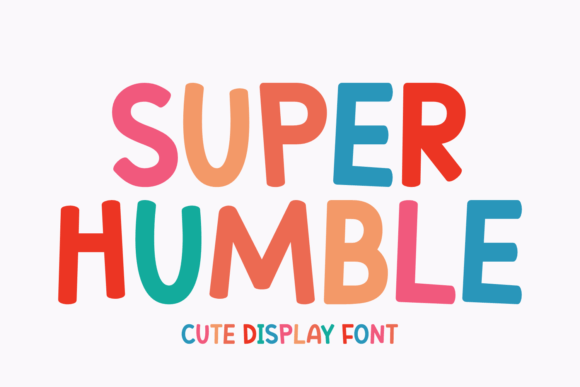
Choosing the right typeface is often the difference between a design that feels amateurish and one that communicates professional warmth. Super Humble has emerged as a distinct display font meant to inject charm and joy into any project. Possessing a neat and cheerful demeanour, this font holds a unique allure that is simply unforgettable. However, its playful nature can lead designers, especially beginners, to misuse it. Understanding how to wield this tool correctly ensures your work remains legible, impactful, and aesthetically pleasing.
Whether it’s gracing a headline, adorning a tote bag, or embellishing a T-shirt, Super Humble elevates your designs to the next level. Yet, many users overlook the technical nuances of display typography. This guide explores common pitfalls and offers practical advice on integrating this Eastern European-inspired typeface into your creative workflow effectively.
Understanding the Essence of Super Humble
Before diving into application, it is vital to understand what makes this font special. Perfectly suited for product packaging or a vibrant book cover, Super Humble exhibits a delightful charm that captures the essence of the Eastern European spirit. It combines a chunky design with lovely accented characters, making it an excellent choice for magazines, greeting cards, posters, labels, and logos.
The "chunky" aesthetic provides weight and presence, while the rounded edges soften the visual impact, creating a friendly invitation to the reader. This duality is its strength, but also its trap. Because it feels approachable, users often assume it requires little strategic planning. In reality, display fonts demand more careful handling than standard body text fonts because they are designed to be seen, not just read.
Common Mistakes and How to Avoid Them
Even experienced creators can stumble when working with character-rich display fonts. Here are the most frequent errors and how to correct them to maintain high-quality output.
Mistake 1: Using It for Body Text
The most critical error is using Super Humble for long paragraphs or small-print details. Its irregular shapes and decorative accents are designed for short bursts of attention. When used in dense blocks of text, the letters blend together, causing eye strain and reducing readability. This mistake affects communication efficiency; if your audience cannot read your message quickly, they will disengage.
Better Approach: Reserve Super Humble for headlines, subheaders, and short call-to-action buttons. Pair it with a clean, neutral sans-serif or a highly legible serif font for the body copy. This contrast creates a visual hierarchy that guides the eye naturally from the catchy title to the informative content.
Mistake 2: Ignoring Kerning and Spacing
Display fonts often have unique spacing requirements. A common oversight is leaving the default tracking (letter-spacing) unchanged. With a chunky font like Super Humble, tight spacing can make letters collide, while excessive spacing can break the word’s visual unity. This affects the professional presentation of your design, making it look unpolished.
Better Approach: Always manually adjust kerning for headlines. Pay close attention to pairs like "AV," "To," or "Ly." Ensure there is consistent breathing room between characters without creating awkward gaps. For logo design, custom spacing is non-negotiable to ensure the brand name feels cohesive and balanced.
Mistake 3: Overlooking Color Contrast
Because Super Humble has a cheerful and vibrant personality, designers often pair it with equally bright colors. While this can work, poor contrast ratios render the text invisible against busy backgrounds. This is particularly problematic for product packaging or T-shirts where the fabric texture or background pattern interferes with the letterforms.
Better Approach: Test your design in grayscale first. If the text disappears without color, your contrast is insufficient. Use solid, contrasting backgrounds for the best results. If you must place it over an image, use a subtle drop shadow or a solid shape behind the text to ensure legibility.
Strategic Applications for Maximum Impact
To get the most value from your font license, consider where Super Humble truly shines. Its adorable essence can fully capture the eye, but only if placed in the right context.
- Product Packaging: The font’s chunky nature stands out on shelves. Use it for the product name to create immediate brand recognition. Ensure the accented characters are displayed correctly to maintain the authentic Eastern European vibe.
- Apparel Design: On T-shirts and tote bags, simplicity is key. Super Humble works best with short, punchy phrases. Avoid cluttering the garment with too much text; let the font’s personality carry the message.
- Editorial Layouts: For magazines and book covers, use this font to set the tone. It suggests warmth and approachability, making it ideal for lifestyle, travel, or culinary publications. However, keep the layout airy to prevent the heavy letterforms from overwhelming the page.
Evaluating Before You Buy or Download
Before committing to using Super Humble in a commercial project, there are several checks you should perform. These steps protect your investment and ensure the final product meets professional standards.
- Check Character Support: Since the font emphasizes lovely accented characters, verify that it includes all the specific diacritics you need for your target language. Missing accents can ruin the authenticity of the design and alienate native speakers.
- Review Licensing Terms: Ensure your license covers your intended use. A desktop license may not cover web embedding or app integration. Misunderstanding licensing can lead to legal issues and unexpected costs later.
- Test at Various Sizes: Print a test sheet. See how the font looks at 12 points versus 72 points. Some details that look charming at large sizes may become muddy or indistinct when scaled down for labels or business cards.
- Assess Brand Alignment: Ask yourself if the "cheerful demeanour" aligns with your brand voice. While versatile, Super Humble is inherently casual. It may not suit corporate, legal, or high-luxury contexts where seriousness or minimalism is preferred.
Final Thoughts on Typography Choices
Typography is a powerful tool for emotional connection. Super Humble offers a rare combination of structural integrity and playful charm. By avoiding common mistakes like improper scaling, poor pairing, and neglecting spacing, you can harness its full potential. Remember, the goal is not just to make things look cute, but to communicate clearly and memorably.
Take the time to experiment with pairings and layouts. Try it on a mockup of a coffee bag or a festival poster. Observe how the light interacts with the chunky strokes. When used with intention and technical precision, this font does more than decorate; it invites your audience in, creating a sense of warmth and trust that plain text simply cannot achieve. Make informed choices, respect the font’s design intent, and your projects will reflect the quality and care that your audience deserves.