Festival: The Modern Display Font That Transforms Your Creative Projects
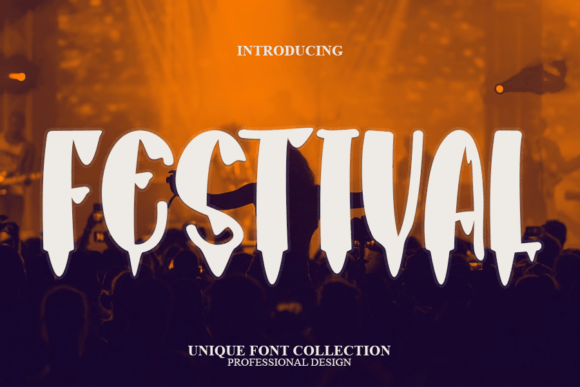
Choosing the right typeface is often the difference between a design that feels amateurish and one that commands attention. Festival has emerged as a standout choice for designers, marketers, and hobbyists alike. It is a cool and modern display font that brings a unique energy to any project. Whether you are crafting handmade invitations, designing digital assets for social media, building slide decks for presentations, or creating heartfelt greeting cards, this font has the potential to be your go-to resource for whatever the occasion demands.
However, the accessibility of modern typography can sometimes lead to misuse. Many creators download stylish fonts like Festival without fully understanding how to leverage their strengths or avoid their pitfalls. This guide explores common missteps when using display typography and offers practical advice to ensure your work remains professional, readable, and visually striking.
Understanding the Role of Display Typography
Before diving into specific techniques, it is crucial to understand what makes Festival distinct. As a display font, it is designed primarily for headlines, titles, and short bursts of text. It is not intended for long-form body copy. A frequent mistake beginners make is attempting to use such stylized typefaces for paragraphs or detailed descriptions. Doing so strains the reader’s eyes and diminishes the impact of the design.
The charm of Festival lies in its character shapes and spacing, which are optimized for larger sizes. When scaled down, these intricate details can become muddy or illegible. By reserving this font for headers, logos, and key visual elements, you preserve its aesthetic value while maintaining clarity for your audience.
Common Mistakes and How to Avoid Them
Even experienced designers can fall into traps when working with trendy typefaces. Here are several areas where users often stumble, along with corrective strategies to elevate your work.
Ignoring Pairing Principles
One of the most overlooked aspects of using a bold display font is pairing it with a complementary secondary typeface. Because Festival has a strong personality, pairing it with another decorative or complex font creates visual chaos. The result is a design that feels cluttered and difficult to navigate.
Better Approach: Pair Festival with a clean, neutral sans-serif or a classic serif font. For example, if you are designing a wedding invitation using Festival for the couple’s names, use a simple, lightweight sans-serif for the date, time, and venue details. This contrast allows the display font to shine while ensuring the essential information is easy to read. The goal is balance, not competition between typefaces.
Misjudging Color and Contrast
Another common error involves poor color choices. Some users place light-colored text on light backgrounds or choose low-contrast combinations that look artistic but fail in practical application. This is particularly problematic for digital presentations or printed materials where lighting conditions vary.
Practical Advice: Always test your designs in different environments. If you are using Festival for a presentation slide, ensure there is sufficient contrast between the text and the background image or color. Dark text on a light background, or vice versa, is usually the safest bet. If you want to get creative, use a semi-transparent overlay behind the text to boost readability without sacrificing style.
Overusing Effects and Distortions
In an effort to make designs pop, some creators apply excessive shadows, glows, or distortions to Festival. While these effects can be useful in specific contexts, they often detract from the font’s inherent modern appeal. Over-stylizing can make the text look dated or cheap, undermining the professional quality of the project.
Correction: Let the font speak for itself. Festival is designed with clean lines and contemporary curves. Often, a flat color or a subtle texture is all you need. If you must add depth, use a very soft drop shadow or a slight emboss effect, but keep it minimal. The sophistication of the font should carry the design, not artificial embellishments.
Evaluating Licensing and Usage Rights
Beyond design aesthetics, there is a critical administrative aspect that many freelancers and small business owners overlook: licensing. Downloading a font from an unofficial source or assuming that a free download permits commercial use can lead to legal complications and unexpected costs.
Always verify the license agreement associated with Festival. Some fonts are free for personal use only, meaning you cannot use them for client work, products for sale, or monetized content. Others may require a separate commercial license. Ignoring these terms can result in cease-and-desist letters or fines, which far outweigh the cost of purchasing the proper license upfront.
Checklist for Safe Usage:
- Confirm whether the license covers personal, commercial, or enterprise use.
- Check if the license applies to print, digital, or both mediums.
- Verify if embedding the font in websites or apps requires an additional webfont license.
- Keep records of your purchase or download confirmation for future reference.
Optimizing for Different Mediums
The way Festival appears on a screen differs from how it looks in print. Digital screens emit light, while printed materials reflect it. This fundamental difference affects perception of weight and spacing.
For digital design, such as social media graphics or web banners, ensure that the font size is large enough to be readable on mobile devices. Test your designs on multiple screen sizes to guarantee that the letters do not blur or merge. For print materials like greeting cards or crafts, pay attention to ink spread. High-quality paper can handle finer details, but cheaper stock may cause thin lines to disappear. Always print a test sheet before committing to a full run.
Enhancing Efficiency in Your Workflow
Using a versatile font like Festival can streamline your creative process if you set up your workflow correctly. Instead of starting from scratch for every project, create templates that feature Festival as the primary header font. Save these templates with predefined pairings, color palettes, and spacing settings.
This approach not only saves time but also ensures consistency across your brand or project series. For educators and marketers who produce regular content, having a reliable template reduces decision fatigue and allows you to focus on the message rather than the mechanics of design.
Final Thoughts on Making the Right Choice
Festival is more than just a trendy typeface; it is a tool that, when used correctly, can significantly enhance communication and visual appeal. By avoiding common pitfalls such as improper pairing, poor contrast, and licensing oversights, you can maximize the potential of this font. Remember that good design is often about restraint and clarity. Use Festival to highlight what matters most, support it with clean secondary elements, and always prioritize the user’s experience.
Whether you are a seasoned professional or just starting your creative journey, taking the time to understand the nuances of your tools will yield better results. Explore the possibilities of Festival, experiment with different layouts, and let your creativity flourish within the bounds of good design practice. Your audience will appreciate the clarity and style you bring to every project.